| Home
About
Photo
What's New
Contact
Favorite Links
|
|
|
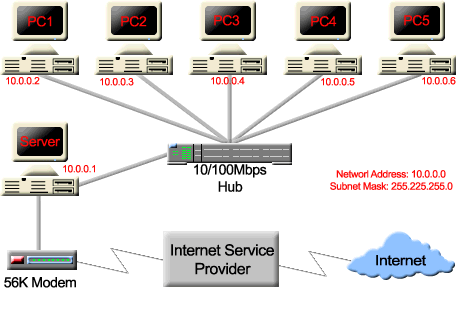
You need a Proxy server software for your
internet connection. You can use Analog X Proxy for free, just
download it from their web site www.analogx.com.
Make sure that your LAN is configured properly, Install the
software and follow these steps.
If you use Internet Explorer:
- On each machine you want to be able to access the proxy on,
just go into the Control Panel->Internet Options, and select
the tab 'Connections'.
- You'll see a button called 'LAN Settings', just click on it,
and you'll see the proxy settings.
- For most systems, all you will need to do is check the 'Use a
proxy server' box, enter the IP address of the machine the proxy
server is running on (in the example above, this would be
'10.0.0.1', and set the Port # to 6588. Select 'Ok', launch
your browser, and you should be good to go!
If you use Netscape:
- Go to the
Edit->Preferences->Category->Advanced->Proxies->
Manual->View.
- Here you'll be able to input the IP and port address mentioned
in the IE config process.

|
|
|


