| Home
About
Photo
What's New
Contact
Favorite Links
|
|
|
5 Terminal Internet
Cafe
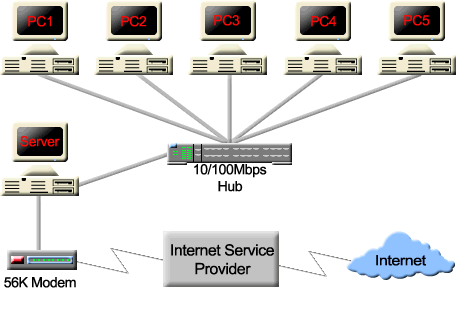
The LAN will use star topology wherein the
networking media run from the Hub to each device that will be
attached to the network. Star topology is easier to design and
install.
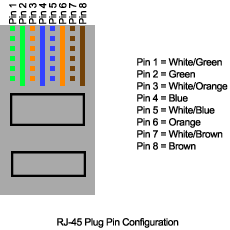
For our Internet Cafe, we need 6 straight through cables to
connect the PC to the Hub. The color coding of the wires will
follow the EIA/TIA-568A standard. The figure shows the pin
configuration of the RJ-45 Plug.
Creating a Stright Through cable
- First determine the distance of the PC to
the Hub.
- Cut a piece of Cat 5 UTP cable to
determined lenght.
- Strip 2" of jacket off of one end of the
cable.
- Hold the 4 pairs of twisted cables tightly
where jacket was cut away, then arrange the wires according to the
coloring scheme illustrated above.
- Flatten, straighten, and line up the
wires, then trim them in a straight line to within 1/2" - 3/4"
from the edge of the jacket. Be sure not to let go of the jacket
and the wires, which are now in order!
- Place an RJ-45 plug on the end of the
cable. Make sure that the metal contacts is facing you, the pin 1
is on the left side.
- Gently push the plug onto wires until you
can see the copper ends of the wires through the end of the plug.
Make sure the end of the jacket is inside the plug and all wires
are in the correct order. Crimp the plug using a crimping
tool.
- Repeat the process to the other end of the cable.
Managing Cables
To manage the cable it is recommended to use one of the following:
- cable ties
- wire management panels
- raceways


|
|
|


